AI Product Design · AssessFirst 98% adoption · –50% analysis time · Support tickets are practically eliminated.
01 — AI CANDIDATE PROFILE
Sole designer on this project, running it alongside other product streams. Partnered with 1 PM acting as PO , handling backlog and stakeholder alignment so I could maintain design ownership across parallel projects.
The Problem
Recruiters were bypassing the product entirely, downloading PDF reports instead of using the app. Not because the product was broken, but because it was asking the wrong thing of them.
AssessFirst's psychometric data is genuinely powerful. But the product assumed recruiters would interpret it themselves. They wouldn't. They couldn't, without training.
That's a product architecture problem, not a training problem.
The insight that reframed everything: the gap wasn't between the science and the user, it was between the data and the decision. Recruiters don't need to understand psychometrics. They need to answer one question: is this candidate right for this role? The product had to answer that for them.
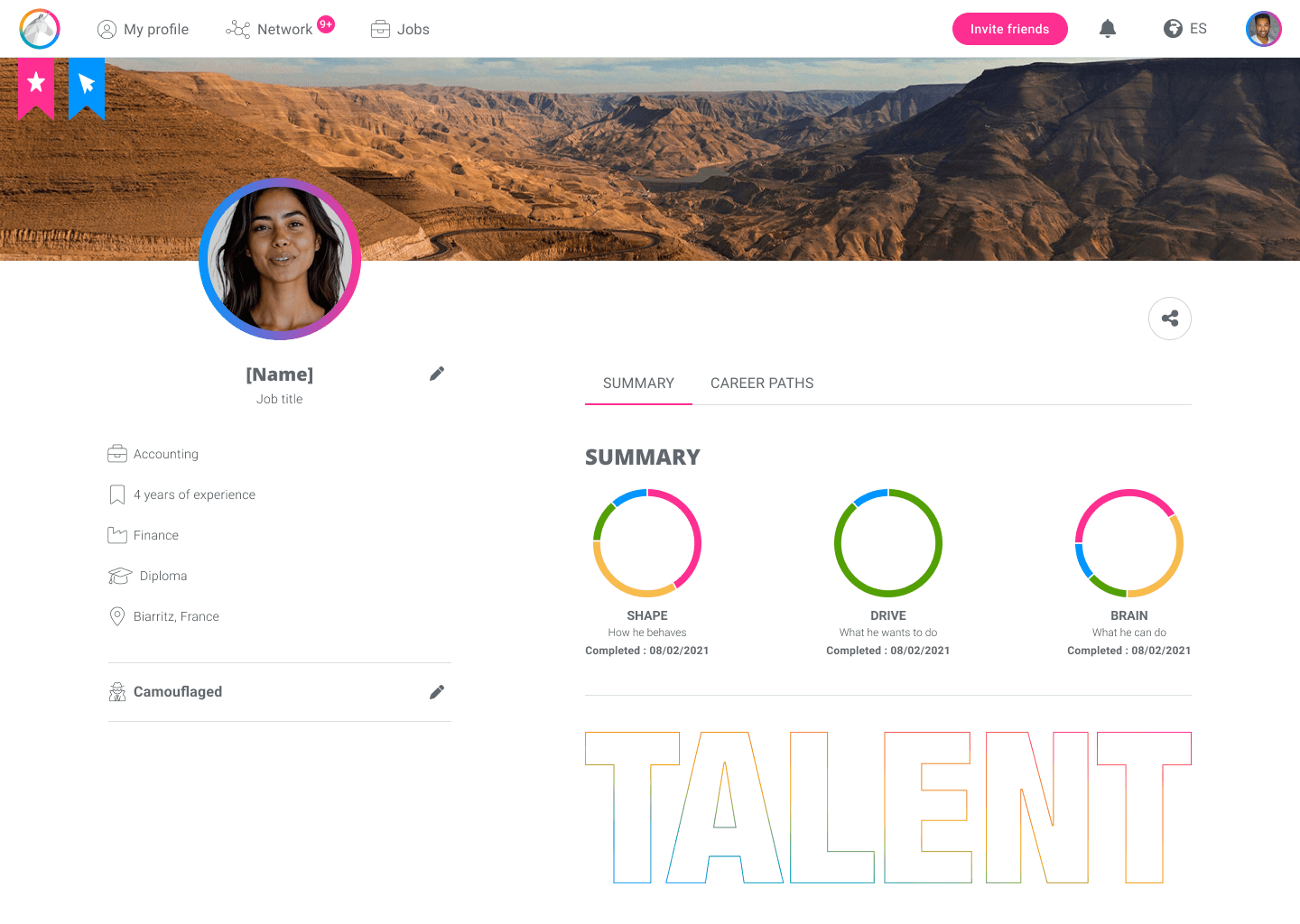
BEFORE // A screenshot of the former candidate profile
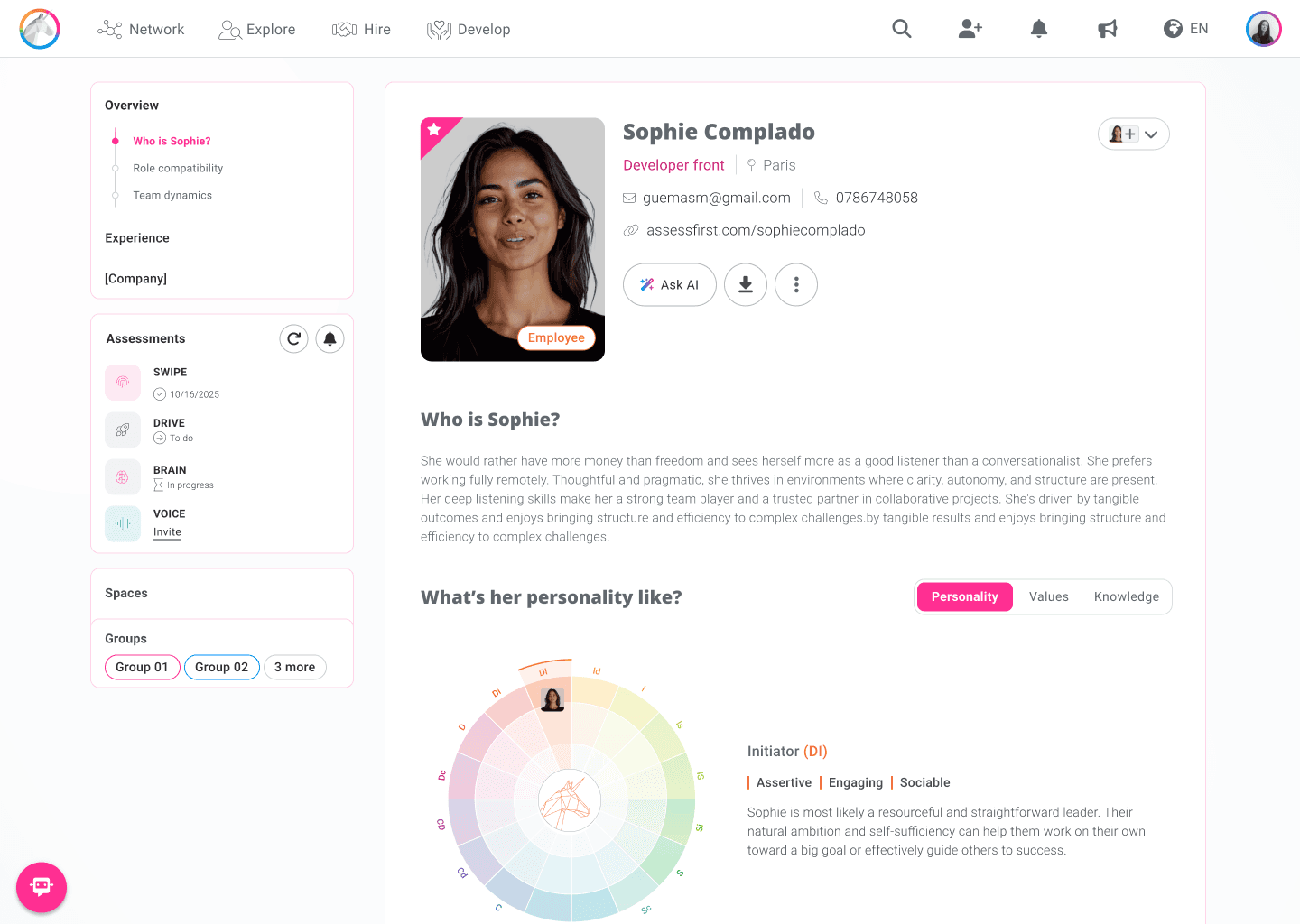
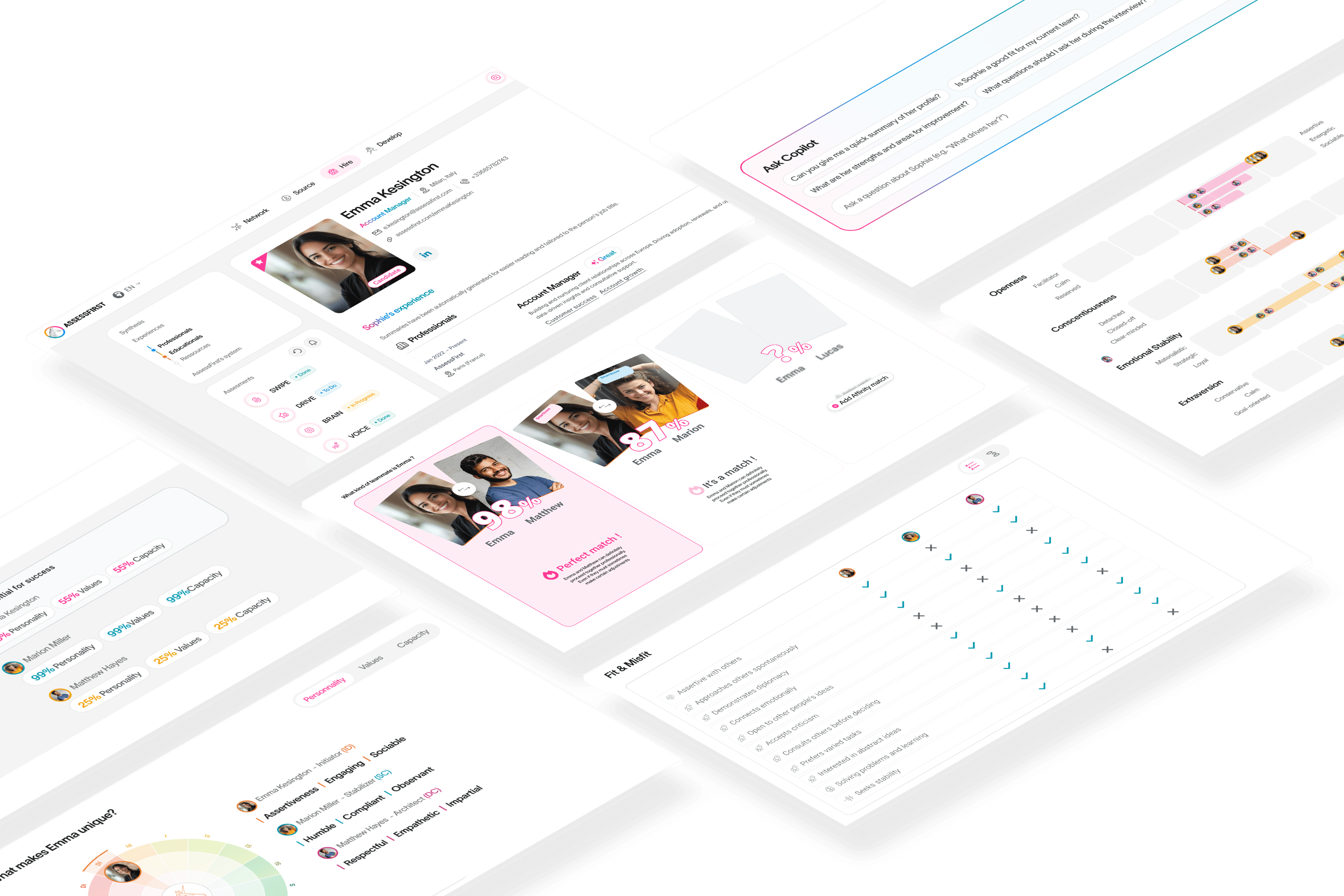
AFTER // Screenshot of the arrival on Sophie's new profile
The Solution
We redesigned the candidate profile as an AI-augmented experience, built around interpretation, not data display.
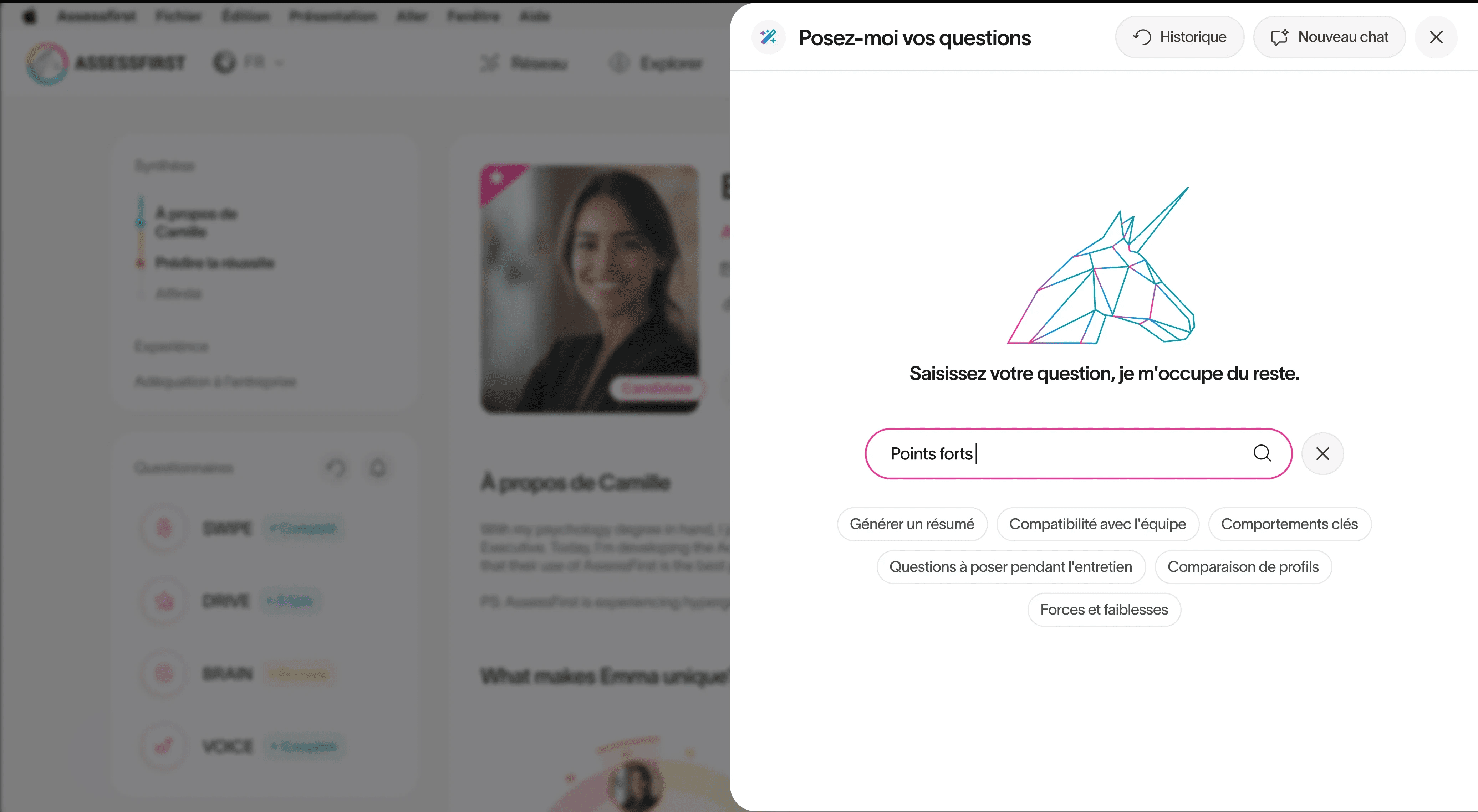
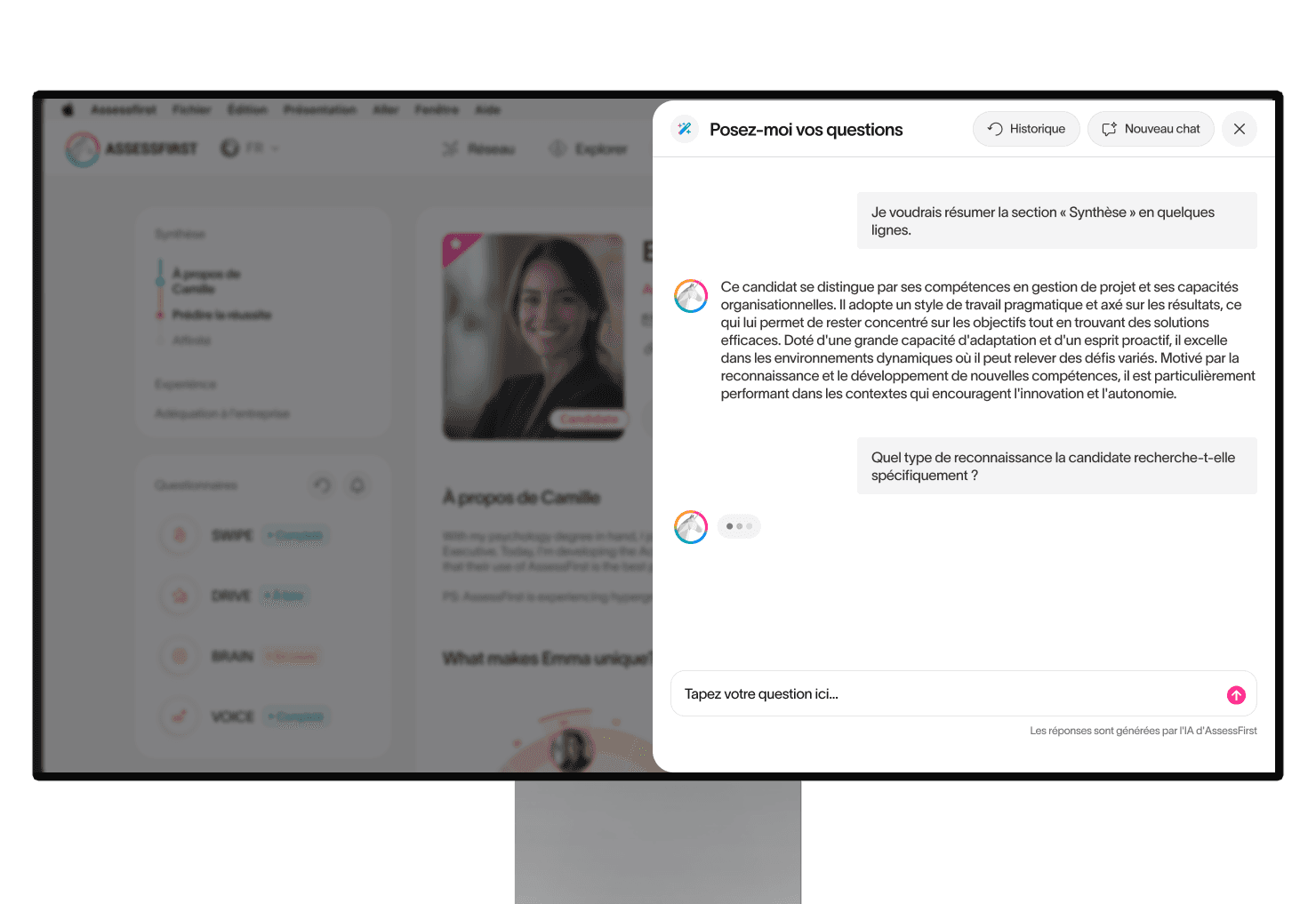
The profile now leads with a narrative candidate summary, reduces trait visualizations to their essential signal, and surfaces interpreted insights in plain language. At the center: an AI Copilot that answers direct questions, "Who is this candidate?" "What should I ask in the interview?" ,grounded in psychometric data, without exposing the underlying model.
The shift wasn't cosmetic. It was a change in the product's fundamental contract with the user: from "here's the data, you decide" to "here's the decision, here's why."

Discovery relied on Mixpanel analytics, user interviews, and shadowing sessions. Watching recruiters bypass entire sections of the profile in real time made the problem impossible to ignore. A/B tested over one month with 90% of users, results were unambiguous.
Focus : The Personality Radar Redesigned

The old radar was static and unreadable without context. Recruiters would glance at it and move on.
The new version is interactive: each trait is selectable, AI-generated explanations surface inline, and visible links between traits let recruiters read personality as a system, not a list of isolated scores.
The result is a visualization that explains itself : reducing cognitive load, eliminating the most common support requests around personality interpretation, and giving recruiters the confidence to act on what they see.
My Thinking
On the interaction model The first direction was to embed AI prompts directly inside the profile. User testing killed it fast. Recruiters didn't want suggestions surfaced passively — they wanted to ask questions and get direct answers. That single observation wasn't a minor insight. It made us scrap the embedded model entirely and commit to a conversational Copilot. It was the right call.
On AI positioning within the profile We had considered adding an AI layer inside the Predict Success section of the profile. I pushed back. Every section of the profile already has contextual AI blocks to guide the user, and the Ask AI Copilot is accessible from anywhere on the page. Adding another layer in Predict Success would have created redundancy without added value, and more importantly, it would have broken system coherence. AI had to remain a unified system, not a feature sprinkled across the page.
On removing the Talent Cloud The Talent Cloud was a complex visualization, loved by power users, opaque to everyone else. Keeping it contradicted the entire premise of the redesign. A product built around simplicity can't have one "expert-only" corner left standing. It signals that the product doesn't fully trust its own direction. I made the case to remove it. We removed it. Existing users adapted.
Same subject for feature "orientation". The solution a été de permettre ces outils dans notre Copilote IA pour ne pas faire perdre de la donnée à nos utilisateurs existants par rapport à leurs usages
On blocking the Talent Mapper from the profile The CPO and the CEO wanted to integrate the Talent Mapper, a team analysis feature, directly into the candidate profile. I held the position: this feature had no place here. The profile is a space for individual decision-making; adding team-level logic overloads the interface and breaks the user's focus. It's not where they expect to find that information.
This wasn't a data-backed argument, it was an assumed design judgment. I supported it by pulling analytics on the Network page shortcuts: barely used in this context. The feature was removed from the profile's scope.
The pattern across all these decisions: I didn't let short-term comfort, for users, stakeholders, or the team override what we knew to be right. That's what ownership looks like at this level.
Impact
98% adoption in A/B testing : the redesign wasn't a preference, it was a replacement
Analysis time cut from 60 to 30 seconds : a direct measure of interpretation friction removed
Support tickets nearly eliminated : the product now explains itself
Accessibility
Color is never the sole indicator of meaning, every score and label has a text equivalent. Contrast ratios verified against WCAG AA. Visualizations differentiated by shape and label, not color alone. This matters especially here: recruiters work under time pressure, often on low-quality screens. Accessibility wasn't a compliance checkbox, it was a usability constraint.
Key Learning
Designing AI products isn't primarily a UI problem. The hard work is deciding what the system should conclude, and making those conclusions feel trustworthy without making the underlying model visible.
The most consequential design decisions on this project weren't about layout or components. They were about what to show, what to remove, and how much to let the AI speak for the product.
Few examples (UI)
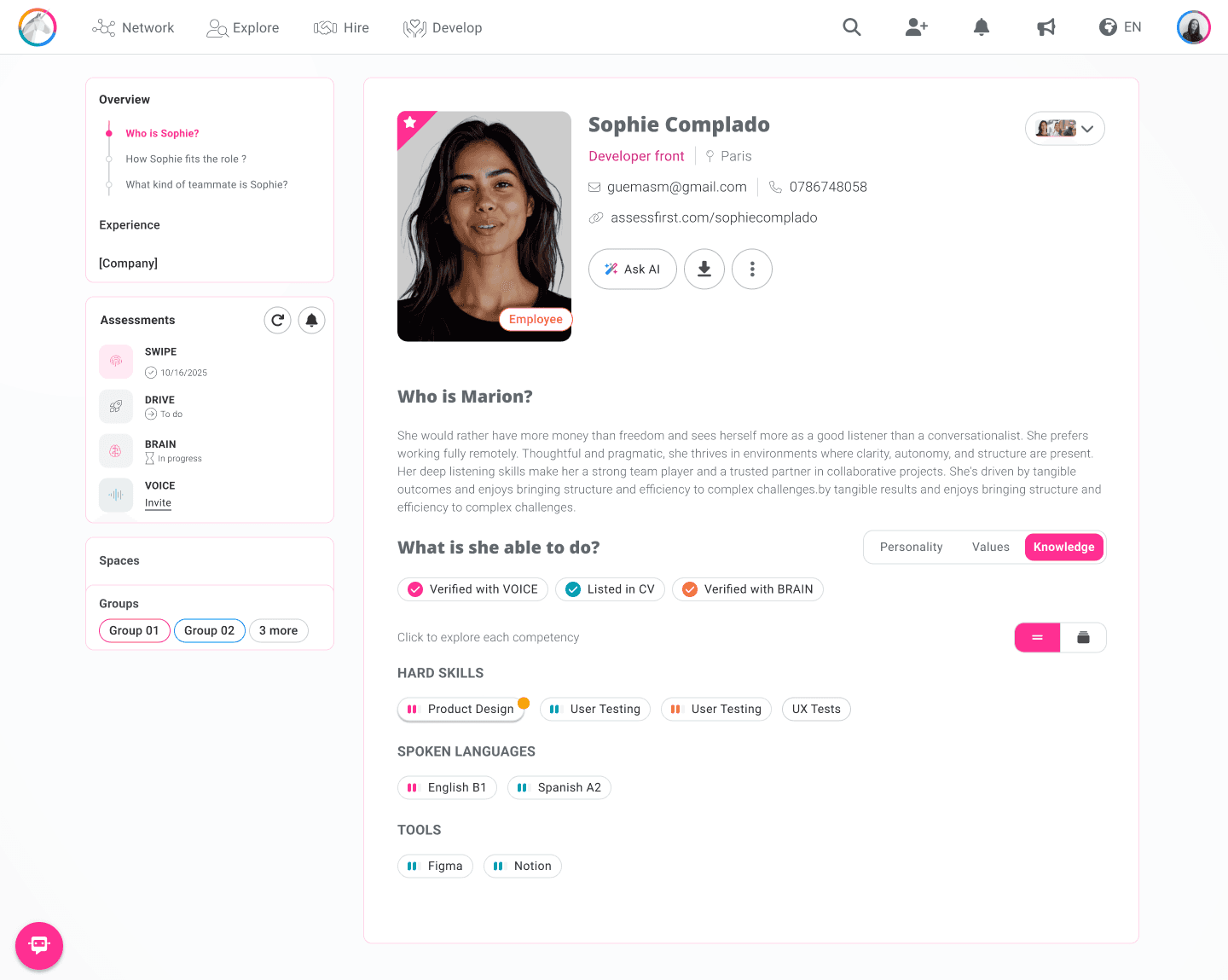
Screenshot of Sophie's new profile - Skills section
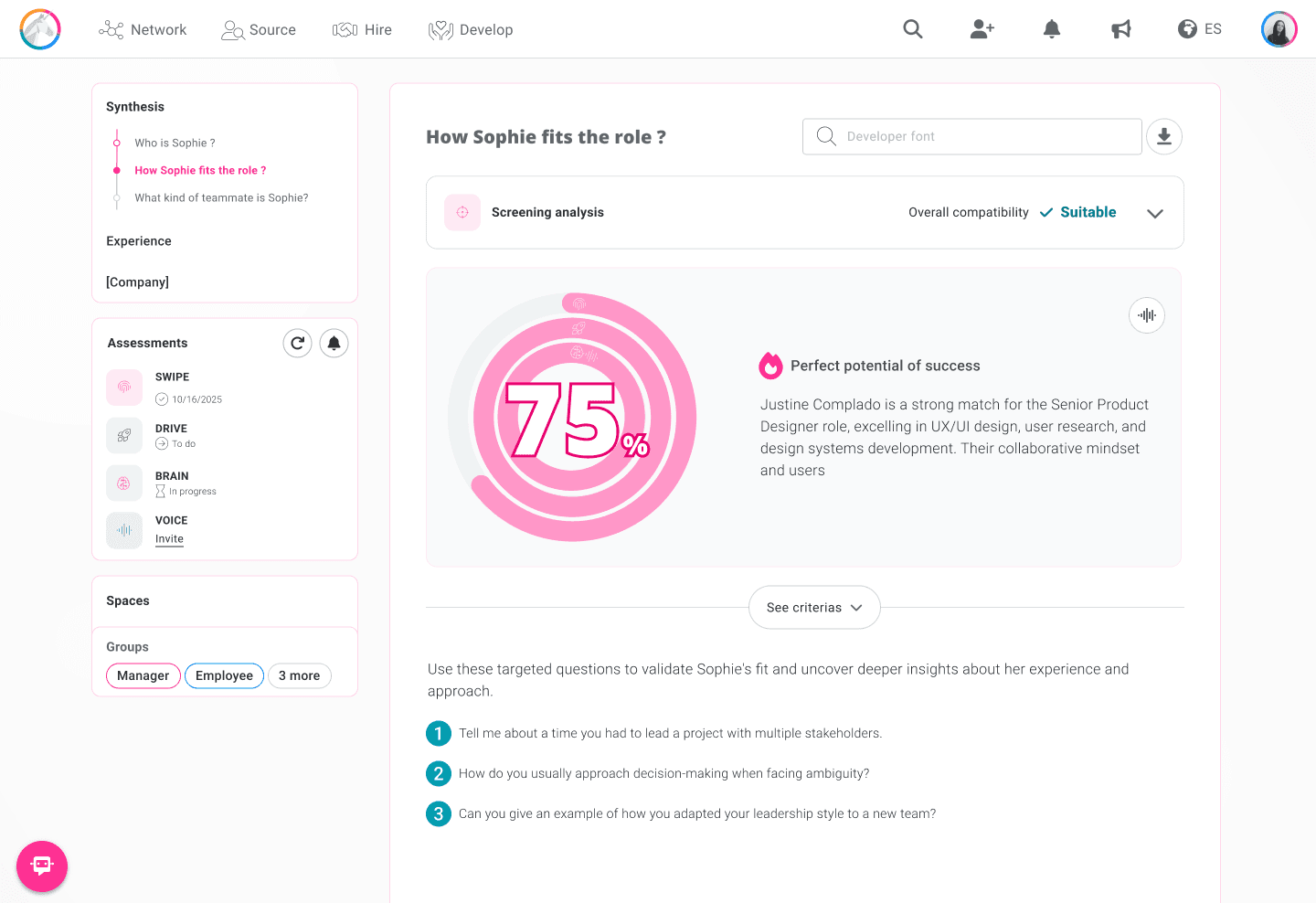
Screenshot of Sophie's new profile - Predict success section
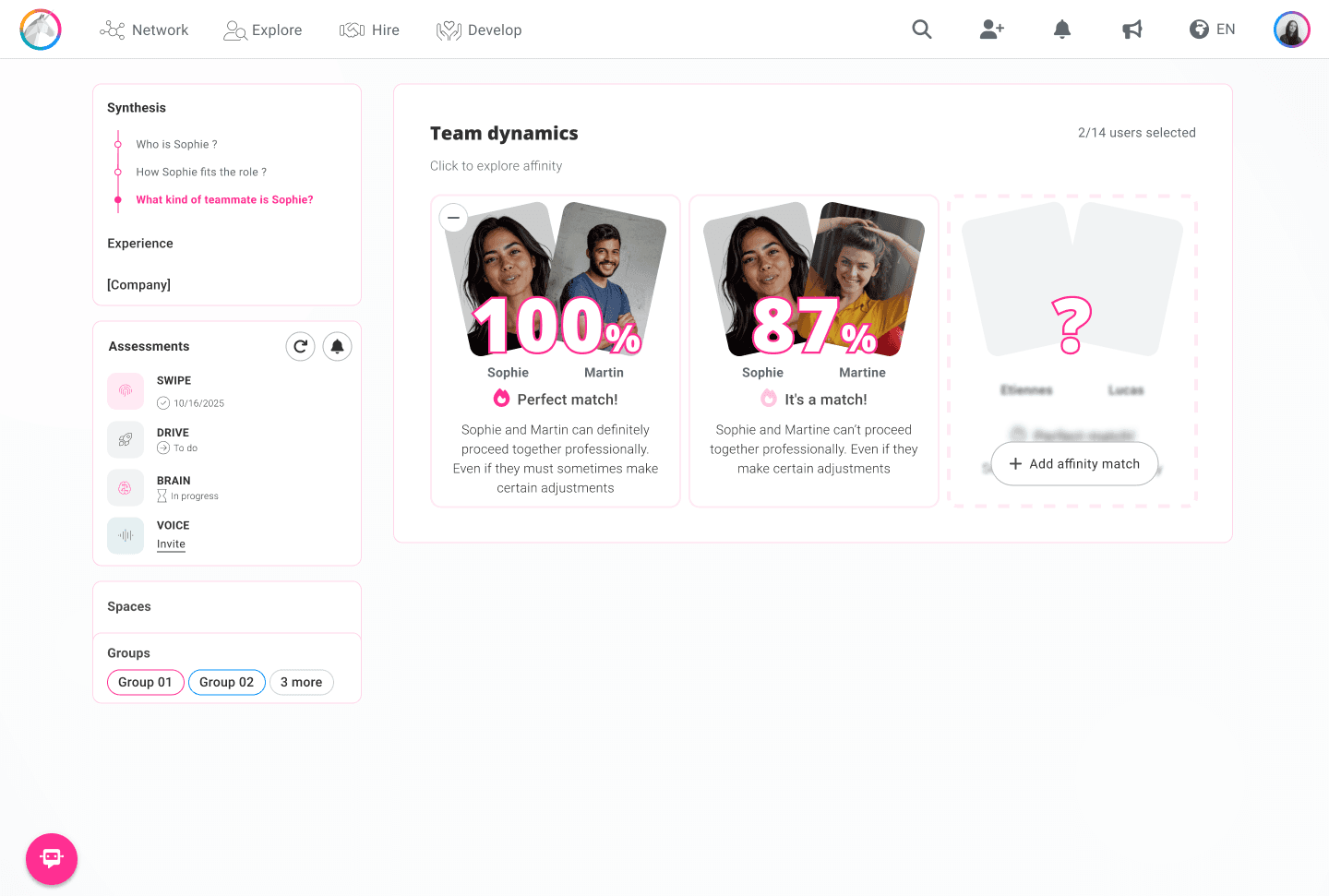
Screenshot of Sophie's new profile - Affinity section
AI Product Design · AssessFirst 98% adoption · –50% analysis time · Support tickets are practically eliminated.
01 — AI CANDIDATE PROFILE
Sole designer on this project, running it alongside other product streams. Partnered with 1 PM acting as PO , handling backlog and stakeholder alignment so I could maintain design ownership across parallel projects.
The Problem
Recruiters were bypassing the product entirely, downloading PDF reports instead of using the app. Not because the product was broken, but because it was asking the wrong thing of them.
AssessFirst's psychometric data is genuinely powerful. But the product assumed recruiters would interpret it themselves. They wouldn't. They couldn't, without training.
That's a product architecture problem, not a training problem.
The insight that reframed everything: the gap wasn't between the science and the user, it was between the data and the decision. Recruiters don't need to understand psychometrics. They need to answer one question: is this candidate right for this role? The product had to answer that for them.
BEFORE // A screenshot of the former candidate profile
AFTER // Screenshot of the arrival on Sophie's new profile
The Solution
We redesigned the candidate profile as an AI-augmented experience, built around interpretation, not data display.
The profile now leads with a narrative candidate summary, reduces trait visualizations to their essential signal, and surfaces interpreted insights in plain language. At the center: an AI Copilot that answers direct questions, "Who is this candidate?" "What should I ask in the interview?" ,grounded in psychometric data, without exposing the underlying model.
The shift wasn't cosmetic. It was a change in the product's fundamental contract with the user: from "here's the data, you decide" to "here's the decision, here's why."
Discovery relied on Mixpanel analytics, user interviews, and shadowing sessions. Watching recruiters bypass entire sections of the profile in real time made the problem impossible to ignore. A/B tested over one month with 90% of users, results were unambiguous.
Focus : The Personality Radar Redesigned
The old radar was static and unreadable without context. Recruiters would glance at it and move on.
The new version is interactive: each trait is selectable, AI-generated explanations surface inline, and visible links between traits let recruiters read personality as a system, not a list of isolated scores.
The result is a visualization that explains itself : reducing cognitive load, eliminating the most common support requests around personality interpretation, and giving recruiters the confidence to act on what they see.
My Thinking
On the interaction model The first direction was to embed AI prompts directly inside the profile. User testing killed it fast. Recruiters didn't want suggestions surfaced passively — they wanted to ask questions and get direct answers. That single observation wasn't a minor insight. It made us scrap the embedded model entirely and commit to a conversational Copilot. It was the right call.
On AI positioning within the profile We had considered adding an AI layer inside the Predict Success section of the profile. I pushed back. Every section of the profile already has contextual AI blocks to guide the user, and the Ask AI Copilot is accessible from anywhere on the page. Adding another layer in Predict Success would have created redundancy without added value, and more importantly, it would have broken system coherence. AI had to remain a unified system, not a feature sprinkled across the page.
On removing the Talent Cloud The Talent Cloud was a complex visualization, loved by power users, opaque to everyone else. Keeping it contradicted the entire premise of the redesign. A product built around simplicity can't have one "expert-only" corner left standing. It signals that the product doesn't fully trust its own direction. I made the case to remove it. We removed it. Existing users adapted.
Same subject for feature "orientation". The solution a été de permettre ces outils dans notre Copilote IA pour ne pas faire perdre de la donnée à nos utilisateurs existants par rapport à leurs usages
On blocking the Talent Mapper from the profile The CPO and the CEO wanted to integrate the Talent Mapper, a team analysis feature, directly into the candidate profile. I held the position: this feature had no place here. The profile is a space for individual decision-making; adding team-level logic overloads the interface and breaks the user's focus. It's not where they expect to find that information.
This wasn't a data-backed argument, it was an assumed design judgment. I supported it by pulling analytics on the Network page shortcuts: barely used in this context. The feature was removed from the profile's scope.
The pattern across all these decisions: I didn't let short-term comfort, for users, stakeholders, or the team override what we knew to be right. That's what ownership looks like at this level.
Impact
98% adoption in A/B testing : the redesign wasn't a preference, it was a replacement
Analysis time cut from 60 to 30 seconds : a direct measure of interpretation friction removed
Support tickets nearly eliminated : the product now explains itself
Accessibility
Color is never the sole indicator of meaning, every score and label has a text equivalent. Contrast ratios verified against WCAG AA. Visualizations differentiated by shape and label, not color alone. This matters especially here: recruiters work under time pressure, often on low-quality screens. Accessibility wasn't a compliance checkbox, it was a usability constraint.
Key Learning
Designing AI products isn't primarily a UI problem. The hard work is deciding what the system should conclude, and making those conclusions feel trustworthy without making the underlying model visible.
The most consequential design decisions on this project weren't about layout or components. They were about what to show, what to remove, and how much to let the AI speak for the product.
Few examples (UI)
Screenshot of Sophie's new profile - Skills section
Screenshot of Sophie's new profile - Predict success section
Screenshot of Sophie's new profile - Affinity section
Scope of Work
The new profile has been 'pimped', making it easier to understand and empowering recruiters. What's really interesting is that the tool is able to give us specific points of analysis."
Hortense Deperrois -Talent Development Manager at Aubert & Duval
The new profile has been 'pimped', making it easier to understand and empowering recruiters. What's really interesting is that the tool is able to give us specific points of analysis."
Hortense Deperrois -Talent Development Manager at Aubert & Duval